Letting an AI agent run your Home Assistant
My Home Assistant isn't managed by me anymore. It's managed by Hermes — an autonomous AI agent that audits entities, repairs automations, builds dashboards, and deploys changes while I'm on the bus. This is the exact setup, including the safety rails and the prompts I actually use.
▶ ⚡ Lazy mode the whole guide as 5 copy-paste prompts — click to expand
Don't want to read? Fair. The only thing you do by hand is (1) install Hermes (here's the full getting-started guide) and (2) create a long-lived token in HA (Profile → Security → Long-Lived Access Tokens → name it hermes-agent). Then paste these prompts into Hermes, in order, and it does the rest:
"Add this to ~/.hermes/.env: HASS_URL=<your HA URL> and HASS_TOKEN=<the token I just made>. Then verify you can reach HA: pull /api/config and tell me the version and location name."
"Install the hab CLI (balloob/home-assistant-build-cli) as a prebuilt binary into ~/.local/bin, log it in with the same URL and token, and confirm 'hab automation list' works."
"Audit my Home Assistant: pull /api/states, classify every unavailable/unknown entity into harmless helpers vs integration-level dead vs genuinely broken, map automations to rooms, and report the top 10 fixes. Change nothing."
"Create a home-assistant skill. Record: the HA URL and token location, how to reach the host over SSH, which integrations own which domains, my entity naming conventions, and every pitfall you hit during the audit. Add these rules: backup or snapshot before any write, preview every change with --plan before applying, never guess entity IDs — verify against live state first, reload instead of restart, disable instead of delete. Update the skill whenever you learn something new."
"Fix the top item from your audit, following those rules. Show me the plan first."
That's it — you're at the same place as the full guide. Everything after this is just more prompts; the full prompt library below covers new hardware, dashboards, log triage and more. Come back and read the safety sections later when the agent earns your trust.
What "autonomous" means here: I message Hermes on Telegram — "the average temperature sensor looks wrong" — and it pulls the live state, finds a renamed entity breaking a template, shows me the one-line fix, applies it, reloads, and confirms the value recovered. No YAML editor. No SSH. No me.
Everything below is how that's wired: the agent host, the control channel into HA, the skills that teach it my house, the discipline that keeps it from breaking anything, and a copy-paste prompt library at the end.
0.The architecture at a glance
| Piece | Role | Where it runs |
|---|---|---|
| Hermes agent | The AI. Talks to me on Telegram, reasons, runs commands. | My main Linux box (any always-on machine works) |
| hab CLI | The write-path into HA. Balloob's Go CLI built for LLM-driven HA management. | On the Hermes host (~/.local/bin/hab) |
| HA REST/WebSocket API | Read state, call services, reload, deploy dashboards. | Home Assistant itself (:8123) |
| Long-lived token | The one credential that unlocks all of it. | Created in HA, stored in ~/.hermes/.env |
| Skills | Mine. Markdown files that teach Hermes my house, my pitfalls, my conventions. | ~/.hermes/skills/ |
| SSH (optional) | Config-file surgery HA's API can't do (.storage edits, log forensics). | Key-only SSH to the HA host |
1.Prerequisites
- A working Home Assistant instance (OS, Container, or Supervised — all fine).
- Hermes agent installed and reachable — mine fronts Telegram so I can drive it from my phone (see Getting started with Hermes if you haven't set it up yet). Any agent with a shell tool works in principle; this guide documents Hermes because that's what I run.
- Network reachability from the Hermes host to HA on port 8123 (LAN or via your reverse proxy).
- 20 minutes.
2.Create the HA long-lived access token
In Home Assistant: click your profile (bottom-left) → Security → Long-Lived Access Tokens → Create Token. Name it something obvious like hermes-agent. Copy it — HA shows it once.
Create a dedicated HA user for the agent (mine is literally named hermes) and mint the token under that user. Every change the agent makes is then attributable in HA's logbook, and you can revoke access without touching your own login.
3.Wire the token into Hermes
On the Hermes host, drop the token and URL into the agent's environment file:
# ~/.hermes/.env
HASS_URL=https://ha.example.com        # or http://192.168.x.x:8123
HASS_TOKEN=eyJhbGciOi...               # the token from step 2
Setting HASS_TOKEN auto-activates Hermes' built-in Home Assistant toolset (ha_list_entities, ha_get_state, ha_list_services, ha_call_service) after a gateway restart. But honestly? Those four tools are the least important part of this setup. The real power comes next.
Paste the token into the chat and say: "Store this as HASS_TOKEN in ~/.hermes/.env together with HASS_URL=<your HA URL>, restart whatever needs restarting, then verify access by pulling /api/config — tell me my HA version and location name." File permissions and the reachability test are handled for you.
4.Install hab — the write path
HA's REST API can read everything and call services, but it can't create automations, disable entities, manage scripts, or preview changes. hab (by Paulus Schoutsen, HA's founder) closes that gap — it's a CLI explicitly built so an LLM can manage HA safely.
# single prebuilt binary, no Go toolchain needed
curl -sL https://github.com/balloob/home-assistant-build-cli/releases/latest/download/hab-linux-amd64 \
  -o ~/.local/bin/hab && chmod +x ~/.local/bin/hab

# auth (same token)
hab auth login --url https://ha.example.com --access-token eyJhbGciOi...
Why hab matters for an agent:
| Capability | REST API | hab CLI |
|---|---|---|
| Read states / call services | ✓ | ✓ |
| Create/update automations & scripts | ✗ | ✓ |
| Disable entities (registry writes) | ✗ (404s) | ✓ |
Preview a change before applying (--plan) | ✗ | ✓ |
| Trigger a config backup before writes | ✗ | ✓ (hab backup create) |
| JSON output an LLM can parse reliably | ~ | ✓ |
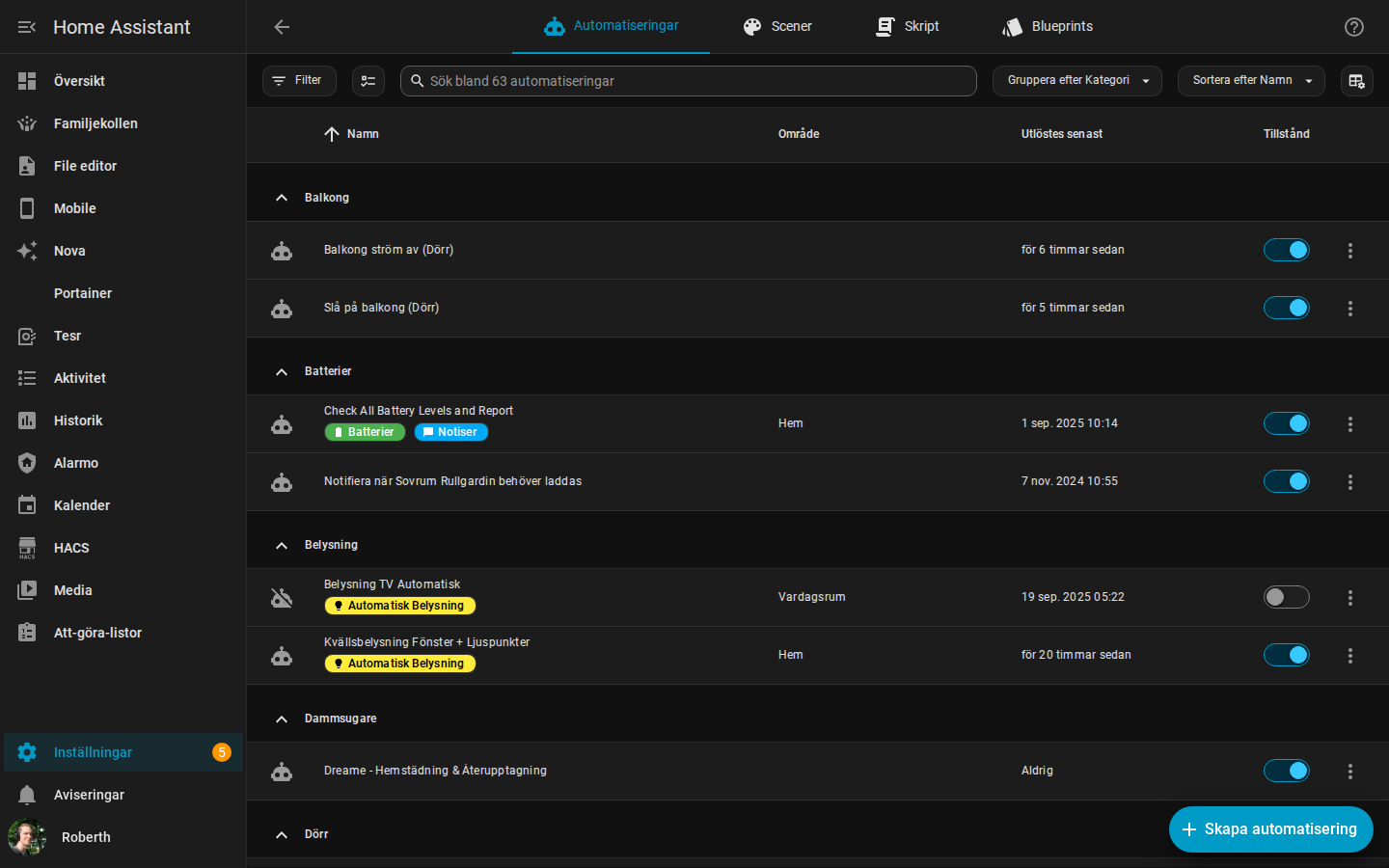
The --plan flag is the single most important feature: the agent shows a diff of what it's about to do, then applies it. That's the difference between "AI changed something in my house" and "AI showed me the change, I said yes."
"Install the hab CLI from balloob/home-assistant-build-cli as a prebuilt binary into ~/.local/bin, authenticate it with my HASS_URL and HASS_TOKEN, and prove it works by listing my automations." The agent picks the right release asset for your platform, runs the login, and reports back what it found.
5.Give it SSH for the 10% the API can't do
Some operations have no API at all: editing .storage JSON (e.g. repointing a generic_thermostat's heater), forensic log analysis, or fixing a YAML file that broke the config check. For those, Hermes has a dedicated key-only SSH account on the HA host. Guardrails that make this safe:
- Read-only by default. The agent reads
configuration.yaml,.storage, and logs freely — but writes go through me unless I've pre-approved the specific operation. - Snapshot before touching
.storage:cp -a /config/.storage /config/.storage.bak-$(date +%s). One bad write to.storagecan soft-brick an instance; with a snapshot it's a 30-second rollback. - Never recreate the container blind. A
docker runwith the wrong/configbind mount makes HA look "factory reset" while your data sits safe on another path. The agent's first command in any recovery isdocker inspectto find the real mount, cross-checked by entity counts.
"Set up your own SSH access to my HA host: generate an ed25519 keypair, give me the public key to authorize, and save the connection details in your home-assistant skill. Until I confirm the key is authorized, read-only." Key generation, known_hosts, and the skill entry are all done by the agent — your only job is pasting one line into authorized_keys.
6.The discipline that makes it safe
Autonomy without rails is how you get a house that reboots itself at dinner time. These are the rules my agent operates under — they're encoded in its skill files so they survive across sessions:
- Backup → plan → apply. Before any write:
hab backup create(or a.storagesnapshot for file edits), then--planpreview shown to me, then apply. Skipping the preview is what causes "WTF dude" moments. - Never guess entity IDs. Every automation/card/script reference is verified against a live
/api/statespull first. A plausible-but-wrong ID (input_boolean.nattlagewhen the real one isswitch.nattlage) either silently drops the automation or makes Spook fire ghosts. Batch-verify the whole list, print MISSING vs OK, fix, then deploy. - Reload, don't restart.
automation.reload/ template reload over WebSocket is enough for most fixes. The house stays up. - Disable, don't delete. Dead entities and duplicate automations get disabled — reversible. Deletes only when proven orphaned.
- Check
config_entriesbefore removing a "dead" device. If it shares a live integration entry, removing it kills the whole integration. (Near-miss with my MQTT entry.) - Show, don't tell, for anything visual. Dashboard changes get a headless-browser screenshot sent to me on Telegram before and after — reasoning about layout from DOM geometry instead of pixels is how dashboards end up ugly.
- Scope discipline. Do only what was asked. No unrequested sudo, no "while I'm in here" refactors.
7.Skills — teaching the agent your house
An agent fresh out of the box knows Home Assistant in general. It does not know that my HA runs in Swedish, that night mode is switch.nattlage not input_boolean.nattlage, that Magic Areas owns the lights so manual light automations are superseded, or that the Dreame vacuum exposes room cleaning as dreame_vacuum.vacuum_clean_segment instead of the core service.
That knowledge lives in skills — markdown files under ~/.hermes/skills/ that load automatically when the task matches. Mine has a home-assistant skill that grew organically: every time the agent hit a pitfall on my instance, we wrote it down. Structure that works:
~/.hermes/skills/smart-home/home-assistant/
├── SKILL.md                          # the audit method, the safety rules, the pitfalls
├── references/
│   ├── hab-cli.md                  # full command map + JSON gotchas + safe-write flow
│   ├── ha_break_fix.md             # recovery playbooks (wrong mount, notify renames...)
│   ├── ha_vacuum_automation.md     # the Dreame room-cleaning pattern that works here
│   ├── ha_lovelace_dashboards.md   # how to build+deploy+screenshot dashboards
└── scripts/
    └── ha_reaudit.py               # before/after delta audit, proves a fix landed
The content isn't generic documentation — it's decisions: "disable, don't delete", "this instance needs plural triggers:/actions: keys in hand-written YAML", "notify services are notify.mobile_app_<device_slug> — confirm the live name before bulk-renaming". Every line in that file is a scar from something that once went wrong.
You don't write this file up front. You start with an empty skill and tell the agent after each session: "add what you just learned to the skill." It compounds fast — within a few weeks the agent stops making the same mistake twice, which is the actual definition of autonomy.
This is the one that actually matters, and you don't have to write a line of it. Just say: "Set yourself up to manage my Home Assistant — run the audit, create the home-assistant skill with everything you learn, and write down the safety rules you'll follow." The agent does the audit, authors the skill, and comes back with a summary of what it recorded. Review it once, correct anything wrong, and the file only gets smarter from there.
8.How work actually flows (a real session)
Yesterday, verbatim, compressed:
"take a look at 🛡Watchman — report is at /config/watchman_report.txt in HA"
What the agent did, unprompted beyond that:
- SSH'd to the HA host, read the report: 8 missing actions, 49 missing entities, mapped to their source files.
- Cross-checked every candidate against the live API instead of trusting the report — found my phone had been re-added as
roberths_s22_*(the dashboard still referenced the old S10 names), the Dreame vacuum's room-clean service had been renamed by an integration update, and one template sensor insensors.yamlreferenced an entity renamed months ago. - Verified the impact live: the "average temperature" sensor was silently stuck at a cached 12.2°C while the real average was 23.8°C — because the template failed and HA kept serving the stale value. Cooling automations were making decisions on garbage.
- Reported back with a triage: one-line fix (do now?), dashboard reference renames (batch, show before save), dead-device cards (needs my call).
Total my input: one message, then "yes". That's the loop you're building toward.
9.The prompt library
These are the prompts I actually run, in the order you'd use them after setup. The first three bootstrap the agent's knowledge of your house; the rest are standing operations.
Bootstrap (run once)
"Audit my Home Assistant. Pull /api/states, classify every unavailable/unknown entity into harmless helpers vs integration-level dead vs genuinely broken. Map automations to rooms. Report counts and the top 10 fixes, but change nothing."
"Create a home-assistant skill. Record: the HA URL/token location, the SSH path to the host, which integrations own which domains (e.g. Magic Areas owns lights), naming conventions you see in my entity IDs, and every pitfall you hit during the audit. Update it whenever you learn something new."
"Add to the skill: before any write to HA, run hab backup create or snapshot .storage; preview every change with --plan before applying; never guess entity IDs — verify against live state first; reload instead of restart whenever possible; disable instead of delete."
Daily operations
"Set up my IKEA Styrbar E2002 remote end-to-end: open ZHA pairing with zha.permit and tell me when to press the pairing button (4 quick presses under the back cover). When it joins, verify the device in the registry, find and import a community blueprint for E2001/E2002 via ZHA (zha_event based), and create an automation: top button toggles [room] lights, bottom turns them off, left/right hold adjusts volume on [room] speaker, top/bottom hold dims. Verify every entity ID against live state first, preview with --plan before applying, then watch for zha_event while I press each button to confirm the mapping works."
"Spook found ghosts: [paste]. Translate from Swedish, find the root cause (it's usually a referenced entity that no longer exists), verify against live state, show me the fix before applying."
"Build an automation: when [person] leaves and it's been more than 3 days since the last full clean, run the vacuum. Verify every entity ID against live state first, create it via hab with a plan preview, and confirm it registers as an entity afterwards."
"Re-pull /api/states and show me the before/after delta — did the dead count actually drop? Which bucket cleared?"
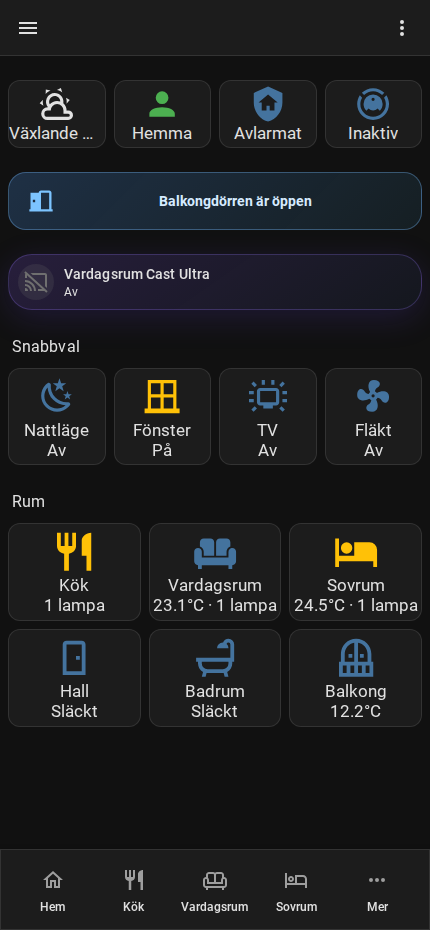
"Add a room tile for the kitchen to the mobile dashboard. Use the entity IDs from live state, deploy via WebSocket, then screenshot it headlessly and send me the image before and after."
"Triage the HA log: clear both log buffers, restart, wait 45s, then tally recurring ERROR/WARNING by integration. Separate benign noise (custom-integration notices, deprecation warnings) from real defects (duplicate keys, invalid YAML, wrong mounts). Fix only the real ones, one at a time."
"Clean up everything that's dead" with no scoping — an agent with write access and a vague mandate will disable your reconnecting Zigbee sensors alongside the genuine zombies. The audit-first prompts above exist precisely so deletions are always driven by a classified list you've seen.
10.Getting data in: MQTT & BLE (supporting act)
The agent configures HA — but it's also the fastest way to get new data sources into HA. Two patterns from my setup:
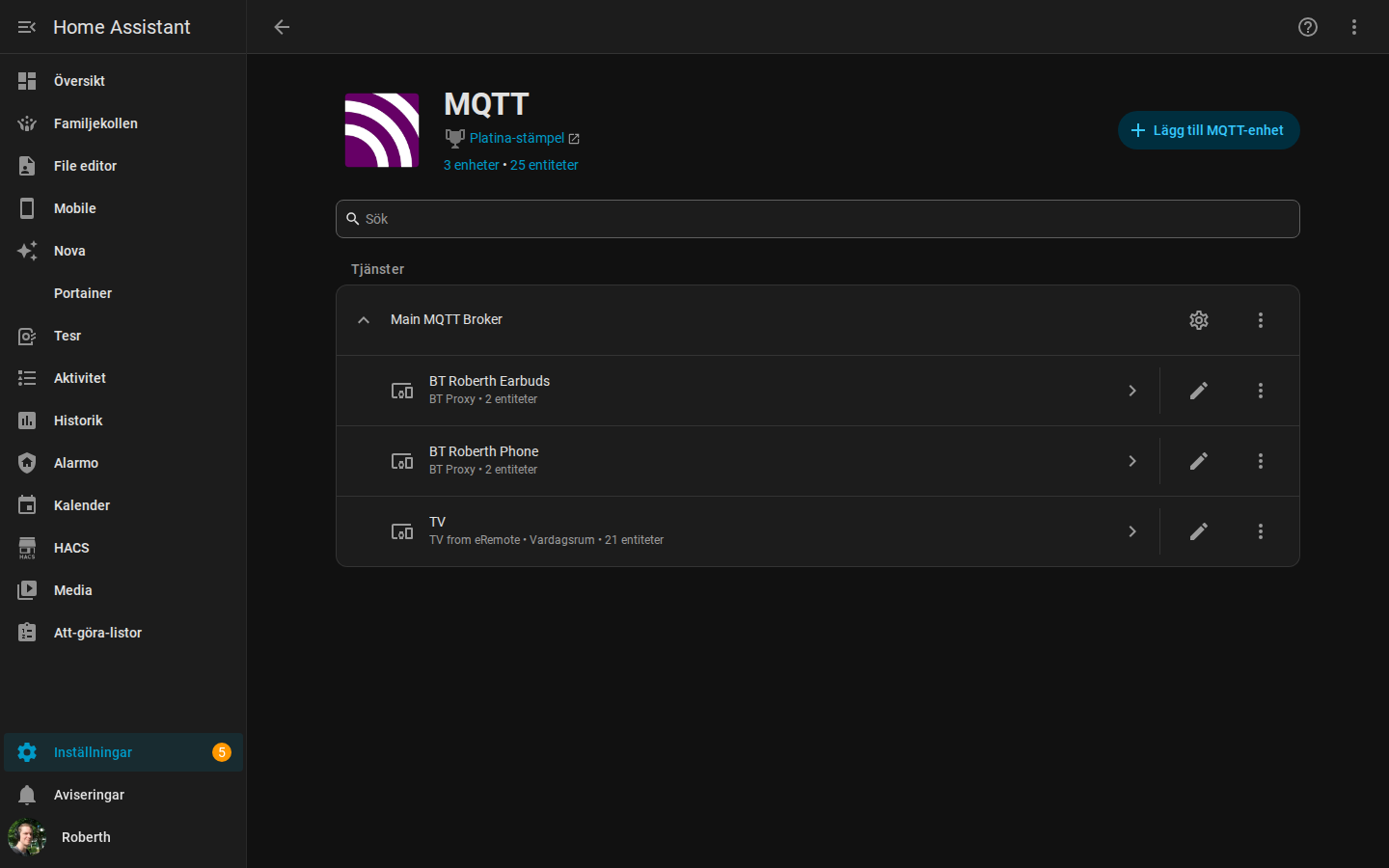
- MQTT as the universal ingest: a Mosquitto broker on the Docker host, HA's MQTT integration pointed at it. Anything that can publish to a topic becomes an HA entity via MQTT discovery.
- BLE presence without ESP32s: a Raspberry Pi 3B running a tiny Python (
bleak) scanner that publishes selected BLE MACs to MQTT; HAmqtt_roomsensors turn those intodevice_trackerentities. My phone and earbuds track room-presence this way — no beacons to buy. The agent wrote, deployed, and systemd-hardened the whole thing from one prompt.
Why mention it in an agent guide? Because the value compounds: the agent that knows your automations also knows your sensors. Ask it "why didn't the kitchen clean trigger?" and it can trace person detection → BLE tracker → MQTT → automation condition in one pass.
11.Optional: a watchdog inside HA
The agent audits on demand; Watchman (HACS) audits continuously. It scans every config file and dashboard for references to entities and services that don't exist and writes a report. The pairing is natural: Watchman detects, Hermes triages and fixes. My actual prompt from yesterday is in section 8 — point the agent at the report path and let it verify each finding against live state before touching anything (Watchman flags stale dashboard references too, and those aren't always worth churn).
12.What this costs & honest limits
- Cost: hab, the APIs, and skills are free. The agent's LLM usage is the only meter — routine HA ops are cheap on a mid-tier model; reserve the expensive models for multi-file forensics.
- It will still surprise you. Rails reduce blast radius; they don't make it zero. The
--planpreview is non-negotiable. - Some things stay manual: pairing new hardware, anything requiring the HA app, and initial integration auth flows (OAuth redirects). The agent handles everything after the pairing dance.
- The skill file is the moat. Two people can run this same guide; the one whose agent has six months of house-specific scars in its skills gets a categorically better operator. Start the file today.
Reference links
- Getting started with Hermes — install, provider, gateway, first week
- Optimizing Hermes — model routing, memory hygiene, skill curation
- Hermes Agent docs — install, toolsets, skills system
- hab — home-assistant-build-cli — the write-path CLI
- HA REST API · HA WebSocket API
- Watchman — missing-entity watchdog (HACS)
- HA MQTT integration · mqtt_room presence
- bleak — cross-platform BLE library used by the Pi scanner
Runs in production on my homelab: 1,700+ entities, Magic Areas, Dreame vacuum fleet automation, BLE presence, per-room climate — all agent-managed. Questions or your own war stories? Find me via the main site.